How the dashboard works

The magic behind the NPI/CPI dashboard — explained without code · June 2026

Every card on the NPI/CPI dashboard is built from information that already exists somewhere else — a Product Manager's status slide, or a Jira release plan. Nothing is typed in twice, and nothing is published without a person approving it.

This page shows exactly which part of each source ends up where on a dashboard card. Follow the numbered, colour-coded markers: a marker on the source (left) lands on the matching marker on the card (right).

📊

1 · The PM's slide

PMs keep writing the same PowerPoint status slides they always have.

📝

2 · Claude drafts a file

Claude Code reads the slide and fills in a draft text file — one per project.

🧑‍💼

3 · A person approves

The operator reads the draft and approves it by renaming the file. No approval, no dashboard.

🖥️

4 · The dashboard

A small script turns the approved files into the cards you see — the same way every time.

The third step is the whole point: the human is the gate, the tools just save the typing.

From the PM's PowerPoint to a project card

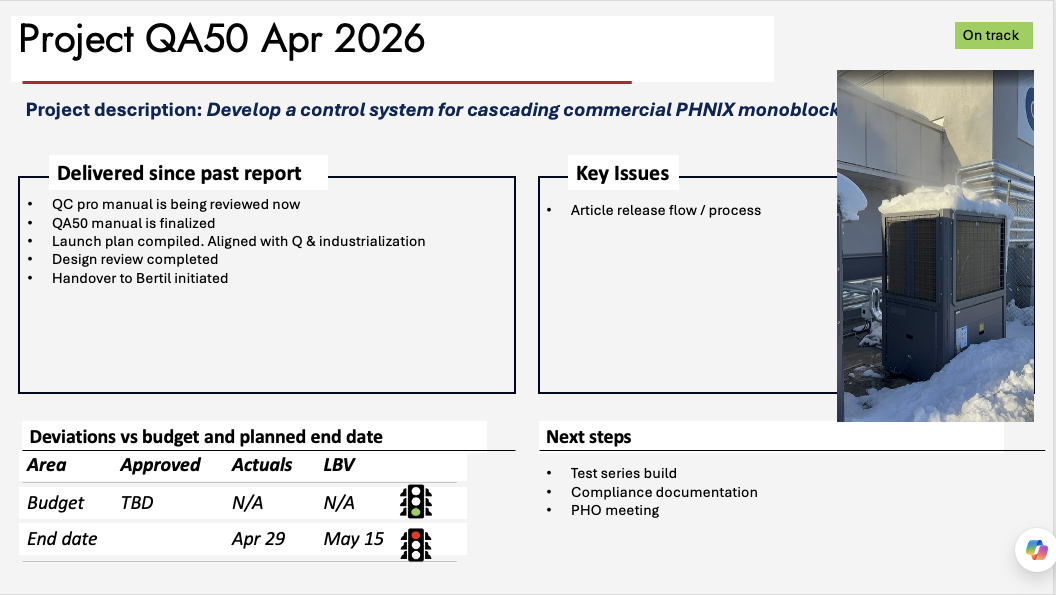
This is a real status slide (project QA50, April 2026). The amber markers show what gets read off the slide — and where each piece lands on the dashboard card.

Source — PowerPoint status slide

A PM status slide for project QA50 with title, status chip, delivered list, key issues, budget table and next steps 1 2 3 4 5 6 7

Where it lands — project card on the dashboard

1QA50Cascade control system industrialisation 2on-track PHO date, from MAB pres: W28 Bertil
85%
5med
Owner: Bertil MAB: 2026-06-21 Updated: 2026-04-28

3Develop a control system for cascading commercial PHNIX monoblocks

Plan

4 Delivered since past report

  • QC pro manual is being reviewed now
  • QA50 manual is finalized
  • Launch plan compiled. Aligned with Q & industrialization
  • Design review completed
  • Handover to Bertil initiated
  1. 7Test series build2026-06
  2. Compliance documentation2026-06
  3. PHO meeting2026-07

Maturity

85%
Components
102 / 110
Sourcing
locked

6 Budget & end date

ApprovedActualsLBV
Budget (kEUR)
End dateApr 29May 15
⚠ Top risk: 5Article release flow / process med
Mitigation: Process review with industrialisation team

Faded fields (owner, MAB date, BOM maturity, sourcing…) are not on the slide — they come from the project file, which the operator fills in. Chapter 3 shows that file.

From the MAB Product-Spec slide — the target PHO week

The MAB deck also holds one Product Spec slide per product (below: QE-M from the May 2026 deck, rebuilt in HTML faithful to the real slide). The dashboard reads the highlighted values — most importantly the line after Target PHO:.

Source — MAB Product-Spec slide

QVANTUM

QE-M

Product Spec

Product data

  • 5New compressor unit for QE-4 and 6
  • R290 refrigerant
  • Backwards compatible
  • Designed for a modular installation (Split)

Prices for the AIO product

Target Net Installer Pricexx kSEK
Target installed pricexx kSEK
Target BOMxx kSEK

Project data

Project leader2Marcus Cederholm
Tech Lead
Estimated man yearsxxxx
LT target volumes4xxxx
Key markets/segments3UK, DE, NL, SE
Target PHO:12026 November
Certifications:August
Resources securedY
Sign off from local PM’s(N)

Where it lands — the QE-M card on the dashboard

QE-MNew compressor unit for QE-4 and 6 development 1PHO date, from MAB pres: W49 2Marcus Cederholm
Owner: Marcus Cederholm 3UKDENLSE

5New compressor unit for QE-4 and 6 — R290 refrigerant, backwards compatible, designed for a modular installation (split).

LT vol target
4xxxx

The faded stage chip is not on the Product-Spec slide — it comes from the project file, like everything else the operator fills in by hand.

From Jira to a software-release card

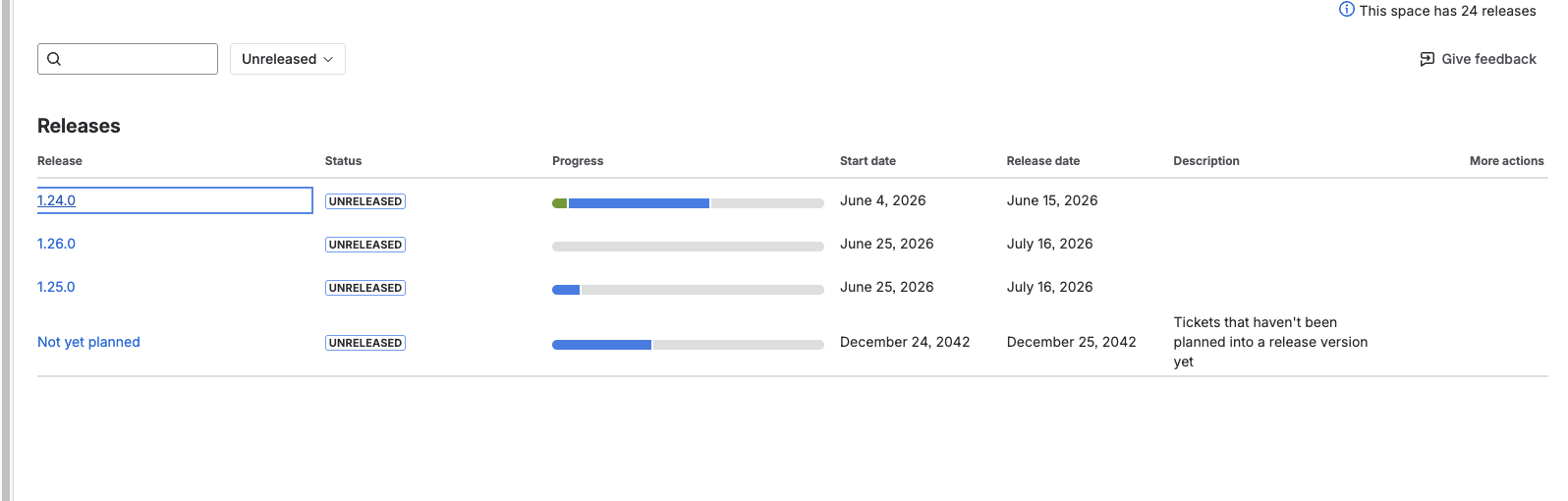
Software releases aren't typed in at all. A read-only connection asks Jira for the release plans of the Display (QD) and App (QHA) teams — below, the real QHA Releases page. The dashboard never writes anything back to Jira.

Source — Jira "Releases" page (read-only)

The Jira releases page for the QHA heat-pump app project, listing versions with status, progress and dates 1 2 3 4

Where it lands — SW-release card on the dashboard

SW1App 1.24.0 2Release: 2026-06-15
5%
Stream: App Release date: 2026-06-15 Work items: 19

3 Work items — 1 of 19 done

Done
1
In progress
13
To do
5

The file in the middle — and the human approval

Between the sources and the dashboard sits one plain text file per project. It's the part anyone can open, read, and check — no Excel, no database, no code. Claude fills it in from the slide; the operator completes the few fields slides don't carry (green markers) and approves.

The project file — projects/qa50.txt

projects/qa50.txt
# QA50 — edit the value after each colon.
# Lines starting with # are ignored.

project_code: QA50
project_name: Cascade control system
owner_pm: Bertil 1
stage: industrialisation
status_tag: on-track

headline: Develop a control system for
  cascading commercial PHNIX monoblocks

milestone_1: Test series build | 2026-06
bom_maturity_pct: 85 2
sourcing_status: locked 3

top_risk: Article release flow / process
risk_severity: med

delivered_since_past_report:
- QC pro manual is being reviewed now
- QA50 manual is finalized

The approval — a rename, done by a person

projects/draft-qa50.txt → you read it → you rename it → projects/qa50.txt
  • 1Owner, MAB date and a few other fields aren't on the slide — the operator types them once, here
  • 2BOM maturity comes from the component tracking, not the slide
  • 3Sourcing status likewise — the dashboard only accepts the exact words early / mid / locked, so wording stays consistent across all projects

Two safety nets are always on: a file still named draft-… is invisible to the dashboard, and every refresh first makes a dated backup of all project files and of the previous site. A wrong word (say, "Concept" with a capital C) stops the render with a message naming the file and line — it can't slip through silently.

Nothing reaches MAB without a person approving it

The slides stay the PMs' own. Claude only drafts; the operator approves by renaming; a small, fixed script renders. Jira is read, never written. Every weekly refresh keeps a dated backup of both the data and the previous dashboard — so any week can be compared with, or restored to, the one before.